

In a country where insecurity is a major
problem, it is advisable to do all you can to safeguard your life and
property and not wait for the government to do the job for you.
problem, it is advisable to do all you can to safeguard your life and
property and not wait for the government to do the job for you.
Setting up a home security system does not need to cost you an arm and a leg.
In fact, according to cnet.com, you
don’t need to wait until you could afford to install a closed-circuit
television in your home to secure your life and property.
don’t need to wait until you could afford to install a closed-circuit
television in your home to secure your life and property.
All you need are two smartphones — one
will be installed in your apartment while the other will be used to
monitor what’s happening from anywhere you are.
will be installed in your apartment while the other will be used to
monitor what’s happening from anywhere you are.

As long as your phones are working
properly and their rear cameras are functioning, you’re good to go. The
process is very easy to set up, but not totally free.
properly and their rear cameras are functioning, you’re good to go. The
process is very easy to set up, but not totally free.
Get a security camera app running on your phone:
To begin, you will need to choose a
security camera app for your phone. Most apps offer up much of the same
features, such as local streaming, cloud streaming, recording and
storing footage locally or remotely, and motion detection and alerts.
Once you’re set up, you will be able to monitor your living space and
control your security camera from anywhere, straight from your phone.
security camera app for your phone. Most apps offer up much of the same
features, such as local streaming, cloud streaming, recording and
storing footage locally or remotely, and motion detection and alerts.
Once you’re set up, you will be able to monitor your living space and
control your security camera from anywhere, straight from your phone.
Installing security camera app on iOS.
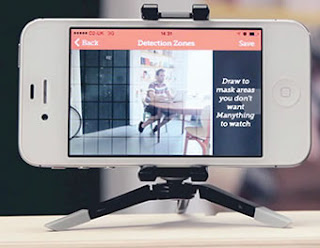
One of the best options for turning an
iOS device into a security camera is an application called Manything (a
mash-up of “Monitor anything”). With Manything, you can set up motion
alerts, choose between a video or stills-only mode, and even integrate
with IFTTT (an abbreviation of “If This Then That”) — a free web-based
service that allows users to create chains of simple conditional
statements, called “recipes,” which are triggered based on changes to
other web services such as Gmail, Facebook, Instagram, and Pinterest —
for virtually endless ways to configure your security camera.
iOS device into a security camera is an application called Manything (a
mash-up of “Monitor anything”). With Manything, you can set up motion
alerts, choose between a video or stills-only mode, and even integrate
with IFTTT (an abbreviation of “If This Then That”) — a free web-based
service that allows users to create chains of simple conditional
statements, called “recipes,” which are triggered based on changes to
other web services such as Gmail, Facebook, Instagram, and Pinterest —
for virtually endless ways to configure your security camera.
Manything is a free download from the
App Store and comes with a completely free plan, allowing up to one
camera and free recording.
App Store and comes with a completely free plan, allowing up to one
camera and free recording.
To get started:
- Download Manything from the App Store to the two iOS
phones.
- From the phone to be installed in your home, open Settings
and disable Auto Lock under General.
- Register or sign in to Manything using an email address or
Facebook account.
- Select Camera mode with the iOS device at home and Viewer
mode for the mobile device.
- Press the red button from the home camera device to start
the live stream.
- From the mobile phone, the live stream will appear in the list of streaming devices. Alternatively, you
can view the stream from a computer by signing in at manything.com.
Installing security camera app on Android
The process for iOS device is very
similar to that of an Android device, except that there is a different
camera app for the latter. Despite so many options to choose from, one
of the best security camera applications available is IP Webcam. There
is a lite version available completely free of charge, but you will need
to purchase the Pro version of the app for $3.99 (about N1,500) to
unlock all features.
similar to that of an Android device, except that there is a different
camera app for the latter. Despite so many options to choose from, one
of the best security camera applications available is IP Webcam. There
is a lite version available completely free of charge, but you will need
to purchase the Pro version of the app for $3.99 (about N1,500) to
unlock all features.
IP Webcam broadcasts both locally and
over the cloud using a service called Ivideon, so you can view your
stream, live, from anywhere.
over the cloud using a service called Ivideon, so you can view your
stream, live, from anywhere.
To setup your Android phone as a security camera:
- Download IP Webcam from Google Play to the home device.
- Launch IP Webcam and set your video preferences, effects, power
management settings, and motion or sound detecting, if desired. (To
broadcast the stream remotely, register or sign in to Ivideon, test
compatibility and enable the cloud stream). - To start the stream, select Start server at the very bottom of the app.
- To view the stream on your mobile device: Find the provided IP
address and port number on the phone setup as a security camera. From
another device (computer, smartphone, or tablet), enter the IP address
in the address bar of the Web browser. Note that if you setup an Ivideon
cloud stream, from a computer, visit ivideon.com and sign in to view.

