

I published a tutorial that explains how to integrate Mailmunch with Feedburner email subscription form. In the tutorial, I used the MailMunch “embedded” form type which lets you easily add the optin form to anywhere on your site.
Unfortunately, the “embedded” form type cannot make your opt-in form to
pop up. If you want to make your form to pop up, you will have to make
use of the MailMunch “popover” form type.
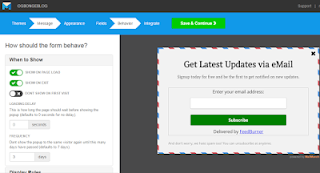
The “popover” form type lets you create pop up subscription forms that can pop up on page load ( when a visitor lands on your website) and on page exit
(when a visitor is about to leave your website). If you set it to pop
up on page load, you can further customize how long the page should wait
before showing the popup. Default settings is 0 i.e no delay.
You can as well set the pop up not to display to the user on their first
visit to your website. i.e the pop up will only display after their
second visit to your site. More so, you can also set how many days
should pass before a visitor sees the pop up form again. If you want it
to be displayed only on a specific page, you can make use of MailMunch
“display rules”.

Well, I’ve published a video on my YouTube channel that explains how to
create pop up form. You can follow the steps in the video to create a
pop up subscription form for Blogger blog or WordPress blog.

